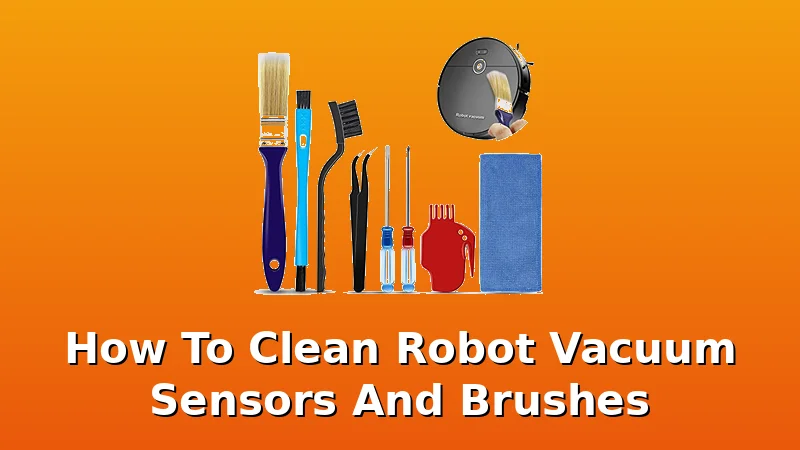
Well, is a robot vacuum really "self-maintaining"? That's the marketing line, anyway. The truth is, the sensors and brushes are the first things to fail, and they fail because of what they're designed to pick up.
Related: How to Clean a Robot Vacuum: 15 Minutes Every Two Weeks
I've been running robot vacuums for about four years now, and I'm on my third unit. My first was a $90 random-navigation bot that bounced off walls and wedged itself under the sofa table every single run.
I upgraded to a ROPVACNIC, then bought a Tikom G8000 Max on a Prime discount. I've pulled bots out from under couches more times than I can count, and I've learned exactly what happens when you ignore the maintenance.
Here's how to clean the sensors and brushes, and what tools actually make it less of a chore.
| Product | Price | Why it won | Why it lost |
|---|
Why sensors get dirty in the first place
Every bot I've owned has the same weakness: the cliff sensors on the bottom and the wall sensors on the side. They're tiny little windows that get coated in a film of dust, hair, and whatever else your floors have.
My husky Koda sheds a whole second dog every spring, and that fine undercoat dust is exactly what clogs these sensors.
When they're dirty, the bot starts doing the zig zag silly thing, re-covering the same corner and ignoring the rest of the room.
It also gets confused about dock-finding, which is the single most underrated spec. A bot that cleans great but can't find its dock is just a very expensive dust collector with anxiety.
How I clean the sensors
I do this every two weeks, and it takes about five minutes. I turn the bot over, and I use a dry microfiber cloth, the kind that comes in the Robot Vacuum Cleaning Kit. The kit's cloth is small enough to get into the sensor recesses without pushing dirt further in.
I wipe each sensor window gently, no liquid, because moisture can mess with the infrared. For the side wall sensor, I use the brush end of the same kit to flick out the hair that wraps around the spinning bumper.
I've seen people use canned air, but that just blows the dust deeper into the housing. A dry cloth and a brush is all you need.
The brush roll is the real battle
The brush roll is where the bot earns its keep, and where it gets punished. After a week of two-dog hair, my G8000 Max's brush looks like a fuzzy caterpillar. The hair wraps around the bristles, and if you let it go too long, it starts to compress and the brush stops spinning effectively.
The suction drops, and the bot starts leaving streaks of hair instead of picking it up. The Robot Vacuum Cleaning Kit includes a small hair cutter, which is a little curved blade with a guard.
I slide it along the brush roll and the hair falls off in strips. It's not a satisfying process, but it works.
The kit also has a cleaning brush with stiff bristles that I use to dig out the hair that's packed into the brush's end caps.
What about the filter and dustbin?
The dustbin is the easiest part. I empty it after every run, because with two labs and a husky, it fills up fast. But the filter is the sneaky one. It's a foam and mesh combo that gets clogged with fine dust, and when it does, the suction drops by maybe 30% without you noticing.
I tap it out over the trash can every week, and I wash it with cold water every month. The 4 PCS Handheld Vacuum Brush Set has a small crevice nozzle that's perfect for getting the dust out of the filter housing without scratching the plastic.
It's a $5.99 set, and I use the brush attachments more than the actual vacuum they're meant for.
The Tikom G8000 Max and its specific quirks
I've had the G8000 Max for about a year now. It has 5000Pa suction and a 150-minute battery, and it's genuinely good for the price. But its sensors are recessed deeper than my old ROPVACNIC, which means they collect more dust.
I've found that the #T2108 11/S Brush Cleaning Tool is the best thing for this specific model because the nylon bristles are long enough to reach into the sensor wells.
The tool is $11.99, which is more than I'd usually spend on a brush, but it's durable. I've had mine for six months and the bristles haven't splayed out like the cheaper ones.
When the sensors fail anyway
Here's the thing nobody tells you: even with regular cleaning, sensors eventually fail. My ROPVACNIC's cliff sensors started acting up after about 18 months. It would randomly stop at the top of the stairs and back away like it was scared, even though the sensors looked clean.
I tried everything, cleaning them, resetting the bot, but the damage was done. That's when I learned that sensor cleaning is prevention, not a cure.
It extends the life, but it doesn't make the bot immortal. If you're seeing erratic behavior and the sensors are clean, it might be time to look at replacement parts.
The Replacement Parts for Shark AI is a good example of what's out there, but make sure you're buying for your specific model.
What I've learned about the tools
I don't track prices day to day, so I won't pretend to know next week's deals. But I can tell you what's worth your money. The Robot Vacuum Cleaning Kit at $9.99 is the one I'd buy first. It covers the basics, and the hair cutter is the only tool I've found that doesn't nick the brush bristles.
The 4 PCS Handheld Vacuum Brush Set is a nice add-on if you want to clean the dustbin properly, but it's not essential.
The #T2108 11/S Brush is for the enthusiast who wants a dedicated tool for the brush roll, and it's good, but it's not a must-have.
And the Shark AI replacement parts are only relevant if you own a Shark, which I don't.
The honest bottom line
Cleaning your robot vacuum's sensors and brushes is a 10-minute job every two weeks, and it's the difference between a bot that works for years and one that dies at 18 months. The tools don't need to be expensive, the $9.99 kit is enough for most people.
I've been doing this for four years, and the bots I've maintained properly have outlived the ones I neglected.
That's not a marketing claim, that's just what happens when you live with these things.